Most Google Ads management advice is written for lead gen. Fill out a form. Book a demo. Score a phone call. That world has almost nothing in common with running Google Ads for a Shopify D2C brand selling $38 serums or $95 activewear leggings.
I have managed Google Ads for ecommerce brands for over fifteen years. In that time I have managed hundreds of thousands of dollars in Google Ads spend across multiple D2C brands, spanning dozens of verticals and every campaign type Google has launched and killed. What I have learned is that the difference between a profitable D2C ad account and a money pit is not budget — it is architecture.
This post is not a list of tips. It is the actual operating framework I use at ScaleMarketer to manage Google Ads for Shopify ecommerce brands doing $50K to $500K per month in revenue. I call it The Profit Stack.
If you run a D2C brand on Shopify and your Google Ads account feels like a black box that eats cash, this post will show you exactly what is happening inside that box and what to do about it.
Why Google Ads Management for Ecommerce Is a Completely Different Discipline
In lead gen, you optimize for a single conversion event. One form, one phone call, one demo booked. The CPA is your north star and you are done.
Ecommerce Google Ads management is a multi-variable problem. You are dealing with hundreds or thousands of SKUs, each with different margins. You have branded search inflating your ROAS. You have Google's automation actively trying to take credit for revenue it did not generate. And you have a purchase cycle that can span multiple touchpoints across Search, Shopping, YouTube, Display, and Discover.
Here is what makes D2C Google Ads fundamentally different:
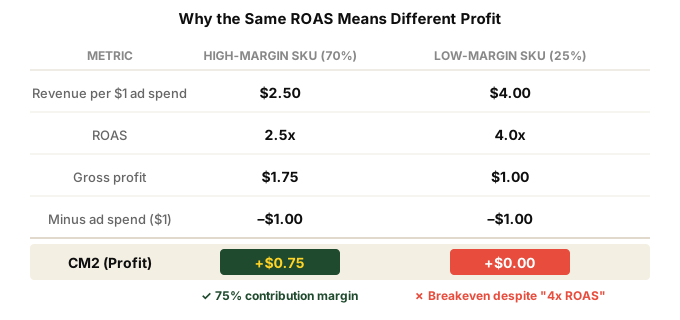
- Margin varies by SKU. A 4x ROAS on a 20% margin product loses money. A 2x ROAS on a 70% margin product prints it.
- Branded search flatters everything. Someone Googles your brand name, clicks your ad, buys. Google claims the conversion. Your ROAS looks incredible. But that customer was already yours.
- Repeat purchases distort attribution. A returning customer clicks a PMax ad and buys again. Google counts it as a new acquisition. It was not.
- Feed quality is half the battle. In lead gen you write ad copy. In ecommerce, your product feed IS your ad copy for Shopping and PMax.
- The goal is not ROAS — it is contribution margin. More on this later.
If your agency manages your D2C account the same way they manage a SaaS client's account, you are leaving money on the table. Or worse, you are lighting it on fire.
The Profit Stack: A 4-Layer Campaign Architecture for D2C Google Ads
After years of testing, rebuilding, and iterating across dozens of Shopify accounts, I have settled on a campaign architecture I call The Profit Stack. It is four layers, each with a specific job, specific budget allocation, and specific guardrails.
The layers, from bottom to top:
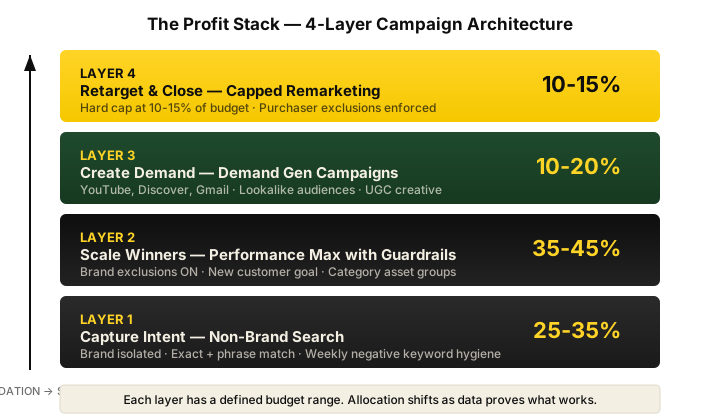
Layer 1: Capture Intent — Non-Brand Search (25-35% of Budget)
This is your foundation. People are actively searching for what you sell. "Best vitamin C serum for dark spots." "Organic pre-workout powder." "Men's moisture-wicking running shorts."
The critical rule here: non-brand search must be completely isolated from branded search. I cannot overstate this. When you blend brand and non-brand keywords in the same campaign — or worse, let them sit in PMax together — you cannot tell whether your ad spend is acquiring new customers or just taxing existing demand.
In my experience, isolating brand from non-brand search reveals the true acquisition cost. And it is almost always uglier than what the blended dashboard shows.
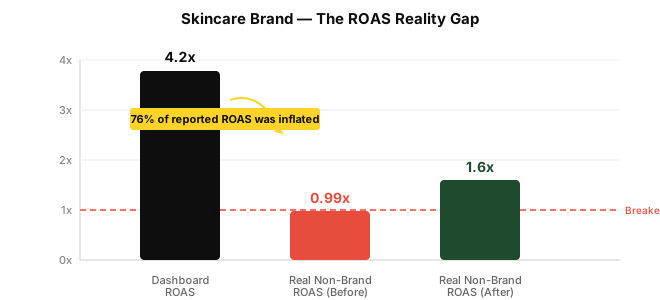
I had a skincare brand come to me reporting a 4.2x ROAS on Google Ads. They were spending $19K per month and their Shopify revenue was $80K. Looked great on the dashboard. When I isolated branded search, their real non-brand ROAS was 0.99x. They were essentially breaking even on actual customer acquisition — every dollar of "profit" was branded search taking credit for organic demand.
We rebuilt the account with brand isolation, tightened the non-brand campaigns to exact and phrase match on high-intent queries, and over nine months closed the gap to a legitimate 1.6x non-brand ROAS. CAC dropped from $58 to $44. That is what real Google Ads management for ecommerce looks like. (Full breakdown in the skincare case study.)
Layer 2: Scale Winners — Performance Max with Guardrails (35-45% of Budget)
PMax gets the biggest slice of budget, but only with strict guardrails in place. I will go deeper on PMax below, but the key controls at this layer:
- Brand exclusions ON. Always.
- New customer acquisition goal enabled.
- Asset groups structured by product category or margin tier — never one giant asset group with everything dumped in.
- Audience signals loaded with your actual first-party data — purchaser lists, high-value segments, lookalikes of your best customers.
PMax is where you scale what is already working in Layer 1. It takes your winning products and finds more buyers across Search, Shopping, YouTube, Display, Discover, and Gmail. But without the guardrails, it will happily spend your budget on branded search and retargeting — then report a stellar ROAS that means nothing.
Layer 3: Create Demand — Demand Gen Campaigns (10-20% of Budget)
This is prospecting. You are putting your products in front of people who have never heard of you, on YouTube, Discover, and Gmail. They are not searching for you. They do not know you exist. You are interrupting their day with creative that earns attention.
Demand Gen is where strong creative and clear product-market fit become non-negotiable. You cannot brute-force prospecting with mediocre assets. The targeting relies on Google's intent signals and your audience lists, so feed it the right inputs and give it room to learn.
I typically allocate 10-20% of total Google spend here, scaling up as we find winning creative angles.
Layer 4: Retarget and Close — Capped Remarketing (10-15% of Budget, Hard Cap)
Retargeting is the most over-funded layer in almost every D2C account I audit. Agencies love it because it produces incredible ROAS numbers. Of course it does — you are showing ads to people who already visited your site and were probably going to buy anyway.
I hard-cap retargeting at 10-15% of total spend. And I enforce purchaser exclusions on every single campaign in the account — not just retargeting campaigns. If someone has already purchased in the last 90 days, I do not want to pay to show them another ad unless there is a specific cross-sell or replenishment play.
I worked with a supplements brand doing $95K per month on Shopify. When I audited their Meta account, 25-35% of their total ad spend was going to retargeting. We cut retargeting spend by 38%. Revenue held completely steady. That delta was pure waste — money spent showing ads to people who were going to convert regardless.
The Profit Stack is not about spending more. It is about allocating spend to the layer where it actually generates incremental revenue.
Google Merchant Center and Shopping Feed Optimization: The Invisible Lever
Here is something most D2C founders do not realize: your product feed is the single most important asset in your Google Ads account. Not your ad copy. Not your bidding strategy. Your feed.
For Shopping Ads and PMax, Google does not let you write ad copy the way you do for Search. Instead, Google pulls your product titles, descriptions, images, prices, and attributes directly from your Merchant Center feed. If your feed is mediocre, your ads are mediocre — no matter how good your campaign structure is.
Product Title Optimization
Google weights the first 70 characters of your product title most heavily. For apparel and accessories, I front-load the attributes that shoppers actually filter by:
Bad title: "The Aura Tee"
Good title: "Women's Organic Cotton V-Neck T-Shirt — Sage Green — The Aura Tee"
The formula I use for D2C apparel: [Gender] + [Material] + [Product Type] + [Key Attribute] + [Brand/Style Name]. For supplements or skincare: [Product Type] + [Key Ingredient] + [Benefit] + [Size] + [Brand].
This is not creative writing. This is information architecture for Google's algorithm. Front-load what matters for search matching.
Custom Labels for Margin Tiers
This is where ecommerce PPC management gets surgical. Shopify does not send margin data to Google Merchant Center by default. You have to set up custom labels to tag your products by margin tier.
I typically use three tiers:
- Custom Label 0: Margin Tier — "high-margin" (60%+), "mid-margin" (40-60%), "low-margin" (under 40%)
- Custom Label 1: Priority — "hero-sku," "new-launch," "clearance"
- Custom Label 2: Seasonality — "evergreen," "seasonal-q4," "limited-edition"
With these labels in place, you can create separate PMax asset groups or Standard Shopping campaigns for each margin tier and bid accordingly. A 3x ROAS target on a high-margin SKU and a 5x target on a low-margin SKU can both be profitable — but only if your campaign structure lets you differentiate.
Supplemental Feeds
Shopify's native Google channel does not pass every attribute Google wants. I use supplemental feeds to add:
- Optimized product titles (without changing your Shopify storefront titles)
- Product type taxonomy aligned to Google's category tree
- Custom labels for margin, priority, and seasonality
- Additional product highlights and structured attributes
- Sale price annotations for promotional periods
Supplemental feeds let you control what Google sees without touching your Shopify store. This is important because your storefront titles should be optimized for human shoppers, while your feed titles should be optimized for Google's matching algorithm. They are different jobs.
Feed Health Monitoring
I check Merchant Center feed health weekly. The things that kill feed performance silently:
- Disapproved products — especially for policy violations you did not know about
- Missing GTINs or incorrect identifiers — tanks your eligibility for certain placements
- Price mismatches between feed and landing page — instant disapproval
- Out-of-stock products still active — wastes spend and kills Quality Score
- Image quality issues — overlays, watermarks, or lifestyle images where Google wants clean product shots
A clean feed is a prerequisite for everything else in the Profit Stack. No amount of campaign optimization fixes a broken feed.
Shopping Ads vs PMax: When Standard Shopping Still Wins
Google wants you to use PMax for everything. And for most D2C brands doing $50K-$200K per month, PMax with proper guardrails is the right primary vehicle. But there are situations where Standard Shopping campaigns at the SKU level still outperform PMax.
When I Use Standard Shopping
- Hero SKUs with proven performance data. If you have five products that generate 60% of revenue, I often pull them into a dedicated Standard Shopping campaign with manual or target ROAS bidding. This gives you granular control over bids at the product level — something PMax does not allow.
- Low-margin products that PMax over-allocates to. PMax optimizes for conversion value, which means it gravitates toward your best-selling products regardless of margin. If your best-seller has a 25% margin, PMax will happily pour spend into it. Standard Shopping lets you set margin-weighted bids.
- New product launches. PMax needs data to learn. For a new SKU with zero conversion history, I often launch in Standard Shopping first to build performance data, then graduate it to PMax once I have 30-50 conversions.
Margin-Weighted Bidding
In Standard Shopping, you can set bids at the product group level. I weight bids by margin:
- High-margin SKUs (60%+): Bid aggressively, target 2-3x ROAS
- Mid-margin SKUs (40-60%): Moderate bids, target 3-4x ROAS
- Low-margin SKUs (under 40%): Conservative bids, target 5x+ ROAS or exclude entirely
This is ecommerce PPC management at its most fundamental. Not all conversions are equal. A $100 sale at 70% margin contributes $70 before ad spend. A $100 sale at 25% margin contributes $25. Treating them the same is how you scale revenue while shrinking profit.
Performance Max Deep Dive: The Controls Most Agencies Ignore
PMax is the most powerful and most misunderstood campaign type in Google Ads for Shopify brands. It can drive incredible scale. It can also burn through budget while reporting metrics that make everything look fine. The difference is configuration.
Brand Exclusions: The Single Most Important PMax Setting
Most agencies leave brand exclusions off in PMax. I see this in 80%+ of the accounts I audit. Here is why that is a problem.
With brand exclusions off, PMax will bid on your branded search terms. Someone searches your brand name, PMax shows a Shopping ad, they click and buy. PMax reports that as a conversion it generated. But that person was searching for YOU — they were already a customer or already aware of your brand. PMax did not create that demand. It just intercepted it and took credit.
The result: PMax over-reports ROAS by 30-60% in most accounts I audit. The dashboard says 5x. Shopify says 2.8x. The gap is branded search inflation.
Turning on brand exclusions forces PMax to compete for genuinely new traffic. Your reported ROAS will drop. Your actual ROAS — measured in Shopify — stays the same or improves because you stop paying for clicks you were going to get organically.
To set up brand exclusions in PMax, you need to submit a brand list request through Google Ads support or your Google rep. It takes 5-7 business days. There is no self-service option as of early 2026. Many agencies do not bother. I consider it non-negotiable.
Asset Group Structure
I structure PMax asset groups by product category or margin tier — never one giant asset group with the entire catalog.
For a skincare brand, the structure might look like:
- Asset Group 1: Serums and treatments (high-margin, hero category)
- Asset Group 2: Cleansers and toners (mid-margin, high volume)
- Asset Group 3: SPF and body care (lower margin, supporting category)
- Asset Group 4: Bundles and kits (highest margin, cross-sell focus)
Each asset group gets its own creative assets tailored to that category. The headlines, descriptions, and images for a $68 serum should be completely different from a $22 cleanser. Different buyer intent, different value propositions, different objections to overcome.
New Customer Acquisition Goal
Google added the ability to optimize PMax for new customers specifically. When enabled, you can tell PMax to either bid higher for new customers or only bid for new customers.
I typically use "bid higher for new customers" rather than "only new customers" because the latter is too restrictive and tanks volume. The bid-up approach lets PMax still convert returning visitors but prioritizes spend toward acquisition. You need to upload your customer list to Google Ads for this to work — PMax uses it to identify who is already a customer.
Why PMax Over-Reports ROAS
Beyond branded search inflation, PMax over-reports because of how it handles view-through conversions and cross-network attribution. Someone sees a Display ad in PMax, ignores it, later searches your brand name on Google, and buys. PMax may claim that conversion.
This is why I never report Google Ads ROAS to clients. We report against Shopify revenue. More on this in the tracking section below.
Search Campaign Structure: Brand vs Non-Brand Isolation
I already touched on this in the Profit Stack overview, but it is important enough to go deeper. The single most common structural mistake in D2C Google Ads is blending branded and non-branded search in the same campaigns.
Why Blending Inflates ROAS by 40-60%
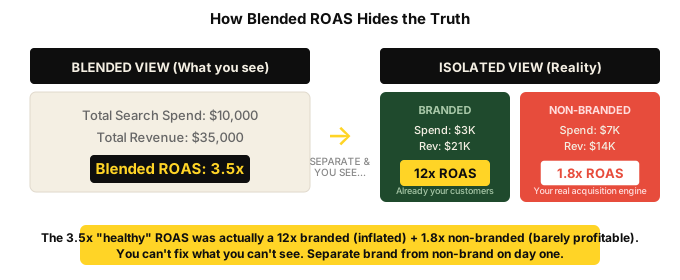
Here is the math. Say you spend $10K on Search. $3K goes to branded keywords. $7K goes to non-brand.
Branded search converts at 8-12% with a CPA of $8-15. Non-brand converts at 1-3% with a CPA of $40-80. When you blend them in one campaign, Google reports a blended CPA of maybe $28 and a blended ROAS of 3.5x. Looks healthy.
But separate them and you see the truth: branded ROAS is 12x (inflated — those were your customers already). Non-brand ROAS is 1.8x. Your actual acquisition engine is barely profitable, and the branded search is masking it.
In my experience, isolating brand from non-brand reveals a 40-60% ROAS inflation in the blended numbers. Every. Single. Time.
Match Type Strategy for D2C Search
For non-brand search in D2C, I use a tiered match type approach:
- Exact match: Your highest-intent, highest-converting queries. These get the most aggressive bids. "Organic vitamin C serum 30ml." "Whey protein isolate chocolate 5lb."
- Phrase match: Broader intent capture with modifiers. "Best vitamin C serum for [skin concern]." These discover new converting queries that you can then promote to exact match.
- Broad match: I use broad match sparingly and only with Smart Bidding (target ROAS or target CPA) as a discovery mechanism. Broad match without automated bidding is a recipe for wasted spend in ecommerce.
I review search term reports weekly. Winning queries get promoted from phrase to exact. Irrelevant queries get added as negatives. This is not glamorous work, but it is where incremental profit lives.
Negative Keyword Hygiene
For D2C brands, the negative keyword list is as important as the keyword list. Common negatives I add on day one:
- Competitor brand names (unless you are specifically running conquesting campaigns)
- "Free," "sample," "coupon code," "discount" — these queries convert poorly and attract bargain hunters
- "Review," "vs," "alternative" — informational intent, better served by content marketing than paid search
- "Jobs," "careers," "salary" — irrelevant traffic that somehow always creeps in
- Wholesale and B2B terms — "bulk," "wholesale," "distributor"
Demand Gen Campaigns for Ecommerce Prospecting
Demand Gen replaced Discovery campaigns and expanded their reach to YouTube in-feed, YouTube Shorts, Discover, and Gmail. For D2C brands, this is Google's answer to Meta's prospecting campaigns — and it is getting better.
What makes Demand Gen useful for ecommerce:
- Visual-first placements. YouTube, Discover, and Gmail are visual surfaces. For product-based businesses, this matters. You can show lifestyle imagery, product demos, and UGC-style creative.
- Lookalike segments. Google lets you build lookalike audiences from your customer lists, similar to Meta's lookalike audiences. Seed it with your highest-LTV purchasers.
- Product feeds in Demand Gen. You can attach your Merchant Center feed to Demand Gen campaigns, which means Google can dynamically show relevant products alongside your creative assets.
I position Demand Gen as the top-of-funnel awareness layer. It does not drive direct ROAS the way Search or Shopping does — and it should not be evaluated on that metric. The job of Demand Gen is to fill the top of the funnel so that Layer 1 (Search) and Layer 2 (PMax) have more qualified traffic to convert.
Measure it on cost per new visitor, new-to-file customer rate, and the overall blended CAC trend. If Demand Gen is working, your Search and Shopping campaigns should see increasing volume at stable or improving efficiency over time.
Retargeting and Remarketing: Less Is More
Retargeting is the most over-funded layer in D2C advertising. I say this with full confidence after auditing dozens of accounts. Here is why.
Retargeting feels efficient because it shows amazing metrics. Low CPA, high ROAS, great click-through rates. But most of those conversions were going to happen anyway. The customer was already on your site, already added to cart, already considering the purchase. Showing them a banner ad did not change their decision — it just gave Google or Meta a conversion to claim.
The 10-15% Rule
I cap retargeting at 10-15% of total Google Ads spend. Hard cap. Non-negotiable. Here is why:
- Incrementality testing consistently shows retargeting has 20-40% true incrementality — meaning 60-80% of the conversions it claims would have happened without the ad.
- Over-investing in retargeting starves prospecting. Every dollar going to retargeting is a dollar not going to acquiring new customers. For a D2C brand trying to grow, this is a death spiral.
- It masks acquisition problems. When retargeting inflates your blended ROAS, you do not see that your actual acquisition engine is underperforming until it is too late.
Purchaser Exclusions: Enforce Everywhere
Every single campaign in your Google Ads account should have purchaser exclusions. Not just retargeting — every campaign. PMax, Search, Shopping, Demand Gen. All of them.
I use a 90-day purchaser exclusion window as the default. If someone bought from you in the last 90 days, they are excluded from all campaigns unless you have a specific replenishment or cross-sell play that justifies re-engaging them.
Why 90 days? For most D2C verticals, the natural repeat purchase window is 60-120 days. A 90-day exclusion prevents you from paying to re-acquire customers during their natural repurchase cycle while still allowing ads to reach them once enough time has passed.
To implement this, you need to upload your purchaser list to Google Ads regularly. I recommend syncing it weekly via Shopify's customer export or using a tool like Littledata or Elevar to automate the sync. Stale exclusion lists are almost as bad as no exclusion lists.
Tracking and Attribution for Shopify: The Gap No One Talks About
Google Ads will tell you one number. Shopify will tell you a different number. GA4 will tell you a third number. They will never agree, and understanding why is critical for making good decisions about your Google Ads for Shopify store.
Why the Numbers Do Not Match
- Google Ads uses its own click-based attribution model. It gives full credit to the last Google click within a 30-day window (default). It counts view-through conversions from Display and Video.
- Shopify attributes revenue to the last click, period. No view-through. No multi-touch. If the last click was an email, Shopify credits email.
- GA4 uses data-driven attribution which distributes credit across touchpoints. Different model, different numbers.
In my accounts, Google Ads typically over-reports Shopify revenue by 20-40%. Sometimes more. This is not Google "lying" — it is a fundamental difference in attribution methodology, compounded by PMax's tendency to claim branded search and view-through conversions.
Enhanced Conversions Setup
Enhanced Conversions is no longer optional — it is essential. With iOS privacy changes, browser cookie restrictions, and ad blockers reducing the data Google receives from standard tracking, Enhanced Conversions closes the gap by hashing and sending first-party customer data (email, phone, address) back to Google for conversion matching.
For Shopify, the setup involves:
- Implementing the Google tag on your Shopify checkout
- Passing hashed customer data (email address at minimum) on the conversion event
- Enabling Enhanced Conversions in your Google Ads conversion settings
Properly set up, Enhanced Conversions recovers 10-15% of conversions that would otherwise be lost to tracking gaps. That recovered data improves Smart Bidding performance because Google's algorithms see a more complete picture.
Server-Side Tagging and Conversions API
For brands spending $20K+ per month on Google, I recommend server-side tagging via Google Tag Manager server container. Instead of relying on the browser to fire conversion tags (which ad blockers and cookie restrictions can prevent), server-side tagging sends conversion data from your server directly to Google.
The Shopify ecosystem has several good options here: Elevar, Littledata, and Analyzify all offer server-side tracking integrations that work with Shopify's checkout. The cost is typically $100-300 per month — trivial compared to the ad spend it optimizes.
The Golden Rule: Report Against Shopify Revenue
I never report against Google Ads dashboard revenue. Never. The client report shows Shopify revenue as the source of truth for total revenue, and we calculate our metrics from there.
The formula is simple:
Shopify ROAS = Total Shopify Revenue / Total Google Ads Spend
This is a blended metric that includes all the revenue Google may or may not have influenced. It is imperfect. But it is consistently imperfect in a way that lets you track trends and make real decisions. Google Ads dashboard ROAS is inconsistently inflated and leads to bad decisions.
Reporting Against CM2, Not ROAS: The Metric That Actually Matters
ROAS is the metric everyone obsesses over. And it is the wrong metric for evaluating D2C Google Ads management. Here is why.
ROAS does not account for margins. A 4x ROAS on a product with 30% gross margin means you spent $1 to generate $4 in revenue and $1.20 in gross profit. After ad spend, you made $0.20 per dollar spent. That is a 20% contribution margin. Fine, maybe.
A 2.5x ROAS on a product with 70% gross margin means you spent $1 to generate $2.50 in revenue and $1.75 in gross profit. After ad spend, you made $0.75 per dollar spent. That is a 75% contribution margin. Far more profitable, despite "worse" ROAS.
The metric I use with clients is CM2 — Contribution Margin 2, which is gross profit minus ad spend.
CM2 = (Revenue x Gross Margin %) - Total Ad Spend
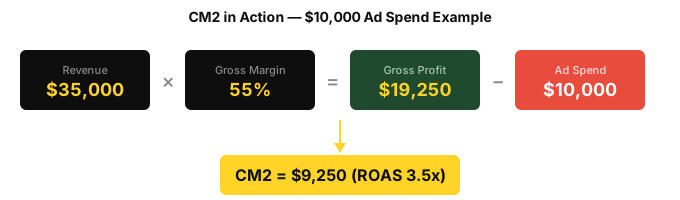
CM2 tells you how much actual profit your ad spend generated after accounting for product costs. This is the number that pays salaries, funds inventory, and grows the business.
Every monthly report I deliver includes CM2 at the account level and, where possible, at the campaign and product level. When you optimize for CM2 instead of ROAS, you make fundamentally different decisions:
- You shift spend toward high-margin products even if their ROAS is lower
- You cut spend on low-margin products even if their ROAS looks great
- You accept lower ROAS on acquisition campaigns because you know the LTV math works
- You stop chasing vanity ROAS numbers that look good in reports but do not move the business forward
If your Google Ads agency reports only ROAS and cannot tell you your CM2, they are managing your account with one eye closed.
Common Mistakes D2C Brands Make with Google Ads Management
After auditing hundreds of D2C Google Ads accounts, the same mistakes come up repeatedly. Here are the ones I see most:
1. Blending Brand and Non-Brand Search
Already covered in detail above. This inflates reported ROAS by 40-60% and masks your actual acquisition cost. If you do nothing else after reading this post, separate your brand and non-brand campaigns.
2. Running PMax Without Brand Exclusions
PMax without brand exclusions is PMax on easy mode — easy for the algorithm, expensive for you. It will gobble up your branded search traffic and report inflated ROAS. Turn on brand exclusions. Accept the temporary ROAS drop. Your actual profitability will improve.
3. Over-Investing in Retargeting
If more than 15% of your Google Ads budget is going to retargeting, you are almost certainly overspending. Those conversions are not incremental. Cap it, enforce purchaser exclusions, and redeploy the savings to prospecting.
4. Ignoring Feed Quality
Your product feed is your ad copy for Shopping and PMax. Generic Shopify product titles, missing attributes, and stale feeds directly limit your impression share and relevance. Invest in feed optimization before you invest in higher budgets.
5. Optimizing for ROAS Instead of CM2
ROAS does not account for margin. A high ROAS on a low-margin product can actually lose money. Track and optimize for contribution margin after ad spend.
6. Scaling Budget Before Fixing Foundations
I worked with an activewear brand that had tried to break through a scaling ceiling three separate times by increasing budget. Each time, efficiency tanked and they pulled back. When they came to ScaleMarketer, we did not touch the budget for four months. We rebuilt the account structure, fixed the feed, isolated brand from non-brand, added purchaser exclusions, and set up proper tracking. Over twelve months, CAC dropped from $74 to $44 — a 40% reduction — and revenue grew 58%. The fix was structural, not budgetary. (Detailed in the activewear case study.)
7. Trusting Google Ads Dashboard Revenue
Google Ads will always over-report. Always. Report against Shopify revenue and reconcile monthly. If your agency only shows you Google Ads dashboard screenshots, ask hard questions.
8. No Purchaser Exclusions
Without purchaser exclusions, you are paying to re-acquire customers who already bought from you. Every campaign — PMax, Search, Shopping, Demand Gen, remarketing — should exclude recent purchasers unless there is a specific strategic reason not to.
9. One Giant PMax Asset Group
Dumping your entire catalog into a single PMax asset group with generic creative is like entering every product in your store into the same race. Your hero SKUs compete with your worst performers for the same budget. Segment by category or margin tier, with tailored creative for each.
10. Not Testing Creative in Demand Gen
Demand Gen is a creative-dependent campaign type. If you set it and forget it with one set of images, you are leaving performance on the table. Test new creative angles monthly — lifestyle vs product, UGC vs polished, different value propositions.
How to Evaluate a Google Ads Management Agency for Ecommerce
If you are evaluating agencies for D2C Google Ads management, here are the questions I would ask. These are not gotchas — they are genuine indicators of whether an agency understands ecommerce PPC management.
Ask About Account Structure
- "How do you separate brand and non-brand search?" If they do not, walk away.
- "Do you run PMax with brand exclusions?" If they say no or do not know what brand exclusions are, that tells you everything.
- "How do you structure PMax asset groups?" Look for category or margin-based segmentation, not one giant group.
- "What percentage of budget goes to retargeting?" If they cannot answer or the number is above 20%, be cautious.
Ask About Reporting
- "Do you report against Shopify revenue or Google Ads dashboard revenue?" This is the litmus test. If they report only Google Ads dashboard numbers, they are not giving you the real picture.
- "Can you show me CM2 reporting?" If they do not know what CM2 is, they are optimizing for the wrong metric.
- "How do you measure incrementality?" Look for thoughtful answers about brand isolation, holdout tests, or pre/post analysis.
Ask About Feed Management
- "How do you optimize product titles for Shopping?" Look for specificity — front-loading attributes, keyword research for product titles, supplemental feeds.
- "Do you use custom labels for margin tiers?" If they do not segment by margin, they cannot optimize for profitability.
Ask About Pricing Alignment
This is the one most brands overlook. How your agency gets paid determines how they manage your account.
- Percentage of ad spend: Incentivizes the agency to increase your spend whether or not it is profitable. Worst alignment model for D2C.
- Flat retainer only: No incentive to grow your business. Fine for maintenance, bad for growth.
- Retainer + performance fee on revenue growth: Best alignment. The agency wins when you win. This is how I structure ScaleMarketer's pricing — a flat management fee plus a 5% performance fee on Shopify revenue above $50K. If we do not grow your revenue, we do not earn the performance component.
What a Proper Google Ads Audit Reveals
If anything in this post made you wonder what your account actually looks like under the hood, here is what I typically find in a D2C Google Ads audit:
- 20-40% of spend going to branded search that is inflating ROAS and masking true acquisition cost
- PMax running without brand exclusions, claiming conversions it did not generate
- No margin-based segmentation — low-margin and high-margin products bidding against each other at the same ROAS target
- Retargeting over-allocated at 20-30% of spend instead of 10-15%
- No purchaser exclusions on most or all campaigns
- Feed optimization untouched — default Shopify product titles, missing attributes, no custom labels
- Tracking gaps — no Enhanced Conversions, no server-side tagging, conversion data leaking through ad blockers
I offer a $499 Profit Audit that covers all of this — account structure, feed quality, tracking accuracy, and a specific action plan with projected impact. It is not a canned template. It is a manual review of your account by someone who has managed Google Ads for D2C ecommerce brands across multiple verticals.
If you want the audit, that is where to start. If you already know you need ongoing management, take a look at the Google Ads for D2C ecommerce service page.
The Bottom Line
Google Ads management for Shopify D2C brands is not about clever hacks or secret settings. It is about architecture, discipline, and measuring what matters.
The Profit Stack works because it enforces the fundamentals:
- Separate brand from non-brand so you can see your real acquisition cost
- Run PMax with brand exclusions so it actually finds new customers
- Optimize your feed because it is your ad copy for 60%+ of your Google spend
- Cap retargeting and enforce purchaser exclusions so every dollar goes to incremental growth
- Report against Shopify revenue and CM2, not Google Ads dashboard ROAS
Most D2C brands do not have a Google Ads problem. They have a Google Ads management problem — the wrong structure, the wrong metrics, and the wrong incentives between them and their agency.
Fix the architecture. Measure what matters. The numbers follow.
Madhukar S.V. is the founder of ScaleMarketer, a performance-aligned Google Ads and Meta Ads agency for Shopify D2C brands. Request a Profit Audit or learn about ongoing management.