You're spending $15,000 a month on Google Ads. Maybe $30K. Maybe more. Your agency sends you a report every month that says ROAS is 3.5x or 4x and everything is "on track." Then you open Shopify, pull up the P&L, and the math doesn't work. Revenue is growing. Margins are shrinking. You can't explain where the money is going.
I've audited hundreds of Shopify D2C accounts that look exactly like this. Brands doing $75K to $150K a month in revenue, running Google Ads and Meta Ads, and the story is almost always the same: the dashboard says one thing, the bank account says another.
This isn't a beginner's guide to Google Ads. There are plenty of those. This is the guide I wish someone had written for the D2C founders I work with every day — the ones who already have campaigns running, already have data, and need to know why that data is lying to them and what a properly structured account actually looks like.
The real problem isn't your ads. It's your account structure.
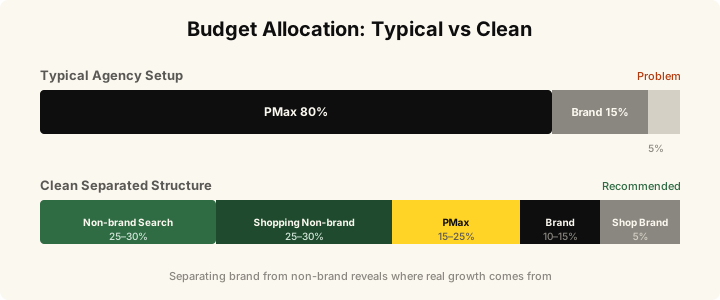
Most Google Ads accounts I audit have the same setup. One Performance Max campaign running everything. Maybe a Search campaign or two. No separation between branded and non-branded traffic. No visibility into which campaigns are actually acquiring new customers vs. re-capturing existing ones.
This is the default. It's what most agencies set up because it's fast, it looks clean in reports, and PMax makes everything look profitable. But for a Shopify D2C brand spending real money, it's a structure designed to hide problems, not solve them.
Here's what's happening under the hood in 9 out of 10 accounts I open:
Your PMax campaign is bidding on your brand name. Performance Max doesn't separate branded from non-branded traffic by default. So when someone searches "your brand name serum," PMax wins that click at a low CPC and claims full credit for the conversion. That customer was going to buy anyway. You just paid Google to intercept them.
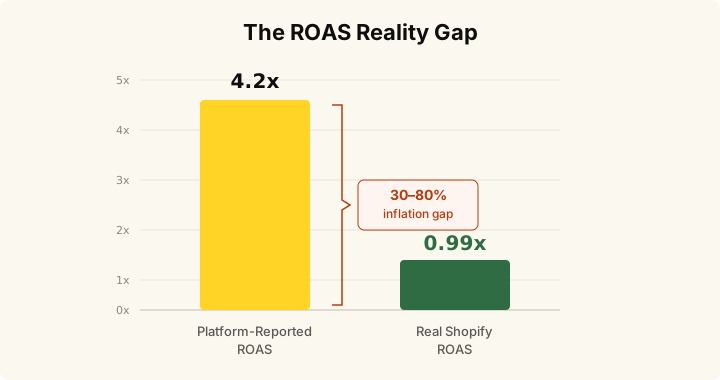
Your reported ROAS is inflated by 30 to 80%. I'm not guessing. I run a simple reconciliation on every audit: pull platform-reported revenue, pull Shopify Reports by traffic referrer for the same period, and compare. The gap is almost always 30% or higher. In one skincare account, reported ROAS was 4.2x. Real Shopify-attributed ROAS was 0.99x.
You have no idea what it costs to acquire a genuinely new customer. When branded search, PMax brand cannibalization, and retargeting all get mixed into one ROAS number, the real cost of acquiring a first-time buyer is invisible. And that's the only number that determines whether your brand grows or stalls.
Nobody is tracking contribution margin at the campaign level. You can quote ROAS to two decimal places but you can't tell me the margin on a Google Shopping order after COGS, shipping, returns, and discounts. Without that number, "scaling profitably" is a guess.
How PMax hides branded revenue
Before I show you the fix, you need to understand exactly how this works — because most founders I talk to don't realize it's happening until I show them.
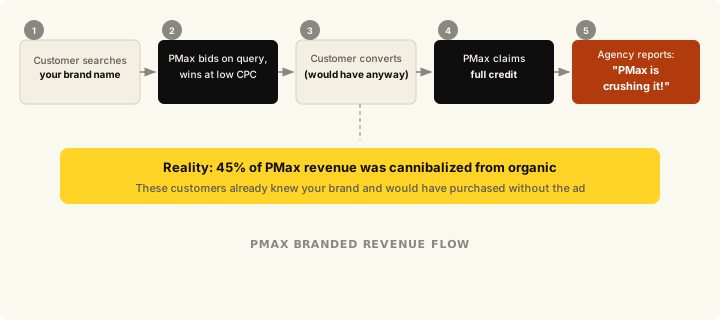
When a customer who already knows your brand types your name into Google, PMax bids on that query automatically. It wins the click at a low CPC, the customer converts (as they were going to anyway), and PMax claims full credit. Your monthly report shows PMax with a 6x ROAS and your agency says "PMax is crushing it."
In reality, that revenue would have come through organic search or direct at zero cost. You're paying Google for conversions you already earned. In the skincare account I'll walk through below, 45% of PMax-reported revenue was cannibalized from organic and branded search.
The fix is simple: turn on account-level brand exclusions in PMax. The number drops — sometimes dramatically. But what's left is real.
What a clean Shopify D2C Google Ads account actually looks like
I'm going to show you the exact campaign structure I set up when I take over a Shopify D2C account. This isn't theoretical. This is what's running right now across every brand I manage.
The principle is simple: separate everything so you can see what's real. Branded traffic gets its own campaigns. Non-branded traffic gets its own campaigns. PMax gets a specific role with specific constraints. Nothing is allowed to hide.
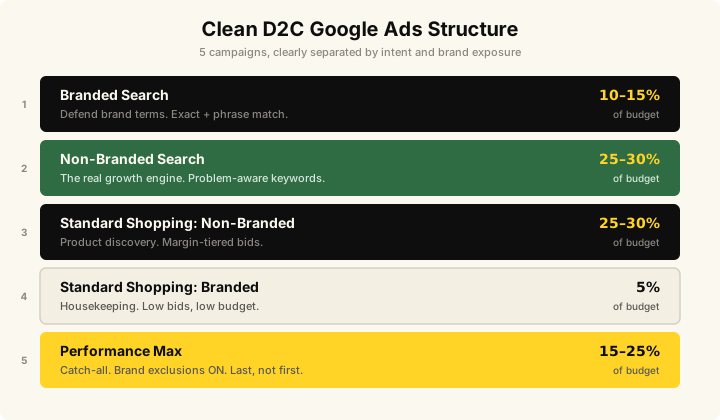
Campaign 1: Branded Search (separate campaign)
A dedicated Search campaign targeting your brand name, brand name + product, brand misspellings, and common branded queries.
This campaign will have a high ROAS. It always does. But that's not the point. The point is to isolate it so it stops inflating your other campaigns. When someone types your brand name into Google, they already know who you are. That conversion was earned by your Meta prospecting, your email marketing, your organic content, your packaging, your product. Google Ads just intercepted the last click.
I run this campaign on exact match and phrase match. Low CPCs, usually $0.30 to $0.80. The budget is just enough to defend your brand terms from competitors who might bid on your name. That's it. Don't celebrate the ROAS here. It's a defensive campaign, not a growth campaign.
Campaign 2: Non-branded Search (the growth engine)
This is where the real work happens. A Search campaign targeting product-category and problem-aware keywords that your potential customers are typing when they don't know your brand yet.
For a skincare brand, that's terms like "vitamin c serum for acne scars," "retinol sensitive skin," "best anti-aging serum." For a supplements brand, it's "magnesium for sleep," "collagen powder reviews," "best protein for women." These are the queries where you earn new customers.
I build this on phrase match and exact match. Not broad match — not until you have 30+ conversions a month and clean data. Broad match before that point is how agencies burn budget and blame "the algorithm."
Structure it by ad group around product categories or intent clusters. Each ad group gets its own set of responsive search ads with headlines that directly match the search intent. No generic "Shop Now" headlines. If someone searches "retinol for sensitive skin," the headline should say something about retinol and sensitive skin. This is basic but almost nobody does it.
Set your bids manually at first, or use maximize conversions with a target CPA once you have conversion data. Do not use target ROAS here — you want volume of new customer acquisitions, not ROAS optimization that will pull your budget toward warm audiences.
Campaign 3: Standard Shopping — non-branded (product discovery)
A Standard Shopping campaign with brand exclusions applied. This is critical. If you don't exclude your brand terms from Shopping, your Shopping ads will show up when people search your brand name, claim credit for those sales, and make the campaign look far more profitable than it actually is.
This campaign is for product discovery. Someone searches "organic face serum" or "collagen powder" and sees your product listing with the image, price, and review stars. They've never heard of you. This is true acquisition.
I segment this by margin tier using custom labels in the product feed. High-margin products (your hero SKUs — serums, premium bundles) get higher bids. Low-margin products (samples, cleansers, accessories) get lower bids or get excluded entirely. There's no reason to pay $1.50 per click on a product that has a $4 margin.
Start with manual CPC or maximize clicks with a bid cap. Move to target ROAS only after you have 30 days of clean conversion data and you know your actual margin per product category.
Campaign 4: Standard Shopping — branded (catch branded product searches)
A separate Shopping campaign that targets branded product searches specifically. When someone searches "YourBrand retinol serum," this campaign catches it. Low bids, low budget — it exists to prevent competitors from showing up on your branded product queries and to keep this traffic out of your non-branded Shopping campaign.
Don't optimize this aggressively. It's housekeeping.
Campaign 5: Performance Max (catch-all, last — not first)
Here's where I disagree with most agencies and most guides you'll read. PMax is not your primary campaign. PMax is a catch-all that runs at a high target ROAS after you've built clean signal with the campaigns above.
Why? Because PMax is a black box. It combines Search, Shopping, Display, YouTube, Discovery, and Gmail into one campaign and doesn't tell you which channel is doing what. If you start with PMax, you have no visibility into your account. You can't tell what's working. You can't tell what's wasting money. And most importantly, PMax leans heavily toward branded search because that's the easiest way for the algorithm to hit your ROAS target.
I run PMax as a feed-only campaign (no creative assets uploaded — just the product feed). Brand exclusions turned on at the account level. New customer acquisition goal enabled. Target ROAS set 30 to 50% higher than your non-branded Shopping campaign. This forces PMax to only win auctions where the expected value is genuinely high, instead of cherry-picking easy branded conversions.
PMax should be the last campaign you turn on, not the first. And it should represent 15 to 25% of your total Google Ads budget, not 80%.
The metrics that actually matter (ROAS is not one of them)
I need to be direct about this: ROAS as reported by Google Ads is not a useful metric for making spend decisions. It's useful for diagnosing problems, which is what the reconciliation exercise reveals. But it's not the number you should optimize toward.
Here are the four numbers I track in every Shopify D2C account:
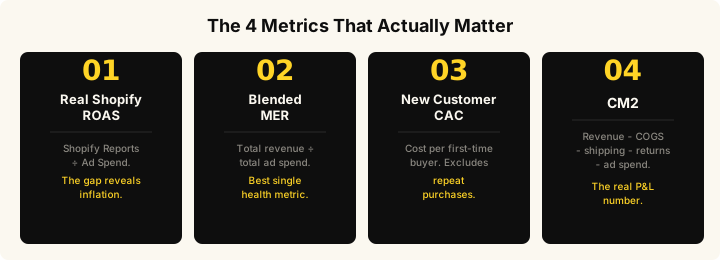
1. Real Shopify-attributed ROAS
Pull Shopify Reports, go to Sales by traffic referrer, filter to the last 30 days, and look at actual revenue tagged to Google Ads UTMs. Divide by your Google Ads spend for the same period. This is your real ROAS. Compare it to what Google Ads reports. The gap is your attribution inflation.
In a healthy account, the gap is under 25%. In most accounts I audit, it's 40 to 80%.
2. Blended MER (Marketing Efficiency Ratio)
Total Shopify revenue divided by total ad spend across all channels. This is the single best health metric for a D2C brand because it accounts for channel overlap, attribution errors, and the halo effect of brand-building. If your blended MER is trending up month over month, your marketing is getting more efficient regardless of what any individual platform reports.
3. New customer CAC
What does it actually cost to acquire a customer who has never bought from you before? This is the number that determines whether your brand can scale. If your CAC is $44 and your average first-order margin (after COGS, shipping, returns) is $52, you're profitable on first purchase. That's a brand that can pour fuel on the fire.
To calculate it, you need to exclude repeat purchasers from your conversion data. Shopify's customer reports give you this. Most agencies don't bother.
4. CM2 (Contribution Margin after ad spend)
Revenue minus COGS minus shipping minus returns minus ad spend, calculated per order, per campaign, or per channel. This is the number that tells you whether a campaign is actually making money, not just generating revenue.
A campaign can have a 3x ROAS and lose money if your margins are thin and your return rate is high. A campaign can have a 1.8x ROAS and be highly profitable if you're selling high-margin products with low return rates. ROAS without CM2 is meaningless.
What this looks like in practice: D2C Skincare, $80K/mo
I want to show you what happens when you apply this structure to a real account because the theory is nice, but the numbers are what matter.
A premium D2C skincare brand came to me spending $2,000 a day across Google and Meta. Their agency reported a 4.2x blended ROAS. The founder was confused because margins kept shrinking even as topline revenue grew. The CFO was starting to ask hard questions.
What I found in the audit
I ran the Shopify reconciliation on day one. Platform-reported ROAS: 4.2x. Real Shopify-attributed ROAS: 0.99x. They were spending a dollar to make a dollar. The brand was essentially breaking even on ad spend before COGS — which means they were losing money on every ad-acquired order.
Four problems surfaced:
Branded search was 38% of total "Google Ads revenue." Nearly four in ten dollars of reported Google revenue came from customers who searched the brand name directly. These people were already sold. The brand was paying Google to take credit for demand it had already earned.
PMax had no brand exclusions. Performance Max was bidding on the brand name, winning those clicks at low CPCs, and reporting them as PMax conversions. PMax looked like the hero campaign in every report. In reality, 45% of its reported revenue was cannibalized from organic and branded search.
28% of Meta spend went to retargeting reporting 8x ROAS. Sounds great until you realize most of that audience — cart abandoners, past purchasers, recent browsers — would have converted without the ad. The real incrementality of retargeting was about 30% of what was reported.
No margin tracking at the campaign level. The brand could quote ROAS to two decimal places but couldn't tell you the margin per campaign after COGS, shipping, and returns.
What I changed (no spend increase)
Week 1 to 2: Installed the campaign structure I outlined above. Branded Search isolated. Non-brand Search rebuilt on phrase and exact match. PMax restructured with brand exclusions on and new-customer-acquisition goal enabled. Standard Shopping added with margin-tier custom labels.
Week 2 to 4: Capped Meta retargeting at 12% of total spend, down from 28%. Added 90-day purchaser exclusions to every prospecting campaign. Reallocated freed budget to Meta prospecting and Google non-brand Search.
Week 3 to 6: Recalibrated target ROAS bids to a 19% CM2 target instead of platform-default ROAS. Higher bids on high-margin hero SKUs like serums and retinol. Lower bids on low-margin products like cleansers and samples.
The results over 9 months
Same daily spend. No increase. The entire lift came from architecture, attribution correction, and bid calibration.
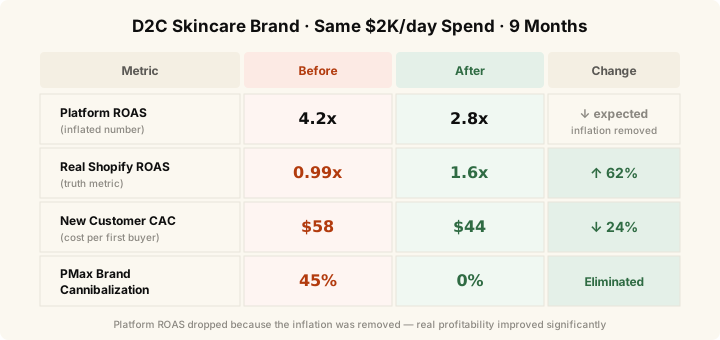
Platform ROAS went down. Most agencies would panic. But it went down because we removed the inflation, not because performance got worse. The only number that matters is real Shopify ROAS — and that went from break-even to 1.6x.
The product feed is half the battle (and most brands ignore it)
Your product feed is what determines whether your Shopping ads show up for the right searches, with the right information, at the right price. And in most accounts I audit, the feed is an afterthought.
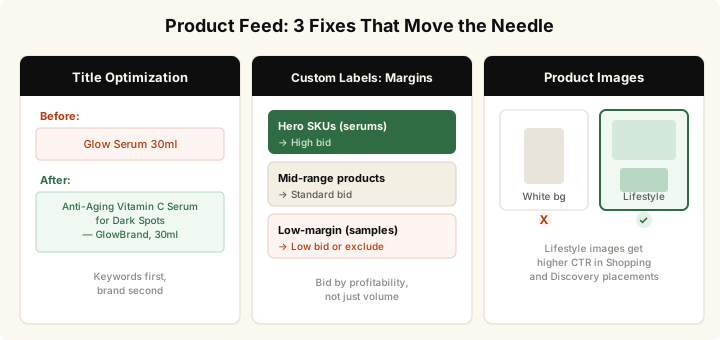
Product titles. Google matches Shopping ads to queries primarily based on product titles. If your title says "Retinol Serum 30ml" and someone searches "anti-aging serum for sensitive skin," you might not show up. I rewrite titles to front-load the keywords your customers actually search. Format: [Primary keyword] + [Product type] + [Key benefit] + [Brand]. So: "Anti-Aging Retinol Serum for Sensitive Skin — YourBrand, 30ml."
Custom labels for margin tiering. Shopify feeds can include custom labels that categorize products by margin, price tier, bestseller status, or seasonal relevance. I use these to create separate product groups in Shopping campaigns so you can bid differently on high-margin vs. low-margin products. You shouldn't pay the same CPC for a $12 cleanser and a $78 serum.
Product images. For D2C brands, your product photo is your ad creative. In a Shopping carousel, every competitor's product shows up side by side. The image is the only differentiator. If you're using the same white-background product shot as everyone else, you lose. Invest in lifestyle shots that show the product in context — on skin, in use, in a routine. Google's Shopping policies allow this and the CTR difference is meaningful.
Conversion tracking: the foundation nobody wants to talk about
I can restructure your campaigns perfectly, write the best product titles, set the ideal bid strategy — and none of it matters if your conversion tracking is broken. This is the boring part that makes everything else work.
Here's the minimum setup I require before touching campaign strategy:
GA4 with ecommerce tracking properly configured. Not just pageview tracking. Full ecommerce event tracking: view_item, add_to_cart, begin_checkout, purchase. All firing correctly with the right revenue values matched to Shopify.
Google Ads Enhanced Conversions enabled. This sends hashed first-party data — email, name, phone — back to Google alongside conversion events. With iOS privacy changes and cookie deprecation, platform-side tracking misses 20 to 40% of conversions. Enhanced Conversions recovers a significant portion of that lost signal.
Server-side tagging or Shopify's native Google channel. Client-side tracking alone isn't enough anymore. Ad blockers, iOS restrictions, and browser privacy features all eat into your data. Server-side events — especially purchase events sent directly from Shopify checkout — give you the most accurate conversion data possible.
Monthly Shopify reconciliation. I pull Shopify Reports by traffic referrer every month and compare against platform-reported revenue. This isn't automated. It takes 15 minutes. And it's the single most important thing you can do to keep your account honest.
What about broad match? What about automated bidding?
Google pushes broad match keywords combined with smart bidding (target CPA or target ROAS) as the default recommended setup. And for large accounts with hundreds of conversions per month, it can work. But for a Shopify D2C brand spending $15K to $50K a month, it's premature.
Broad match needs volume to learn. If you're getting 30 conversions a month, broad match doesn't have enough data to optimize intelligently. It'll spend your budget on tangentially related queries and call it "learning."
My recommendation: start with phrase and exact match on your non-branded campaigns. Build up to 50+ conversions per month with clean data. Then test broad match in a separate campaign or experiment, compare it against your existing campaigns for 30 days, and keep it only if the numbers justify it. Not before.
Same with automated bidding. Manual CPC or maximize conversions with a CPA cap gives you control while you're building data. Move to target ROAS or target CPA after you have a month of solid conversion history and you know your actual margin targets. Automated bidding on day one, before you have data, is letting the algorithm guess — and Google's guess prioritizes its revenue, not your profit.
Questions? Reach out at scalemarketer.com/contact. I respond personally.